

Description
Interactive 3D Anatomy Learning Tool
Overview
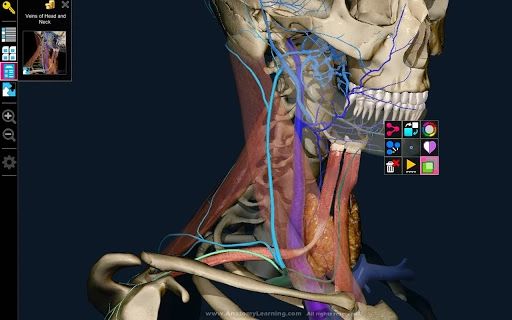
AnatomyLearning 3D is a desktop application designed to support the study and comprehension of human anatomy through an interactive, real-time 3D visualization platform. The software targets students and future healthcare professionals seeking a dynamic, immersive way to explore anatomical structures. By presenting detailed 3D models, the application aims to enhance spatial understanding and retention of complex anatomical relationships. It is developed with input from educators and learners, emphasizing accuracy and usability in academic settings.
The software is intended for use in medical education, anatomy courses, and self-paced study environments. Its primary purpose is to bridge the gap between traditional textbooks and hands-on dissection by offering a digital alternative that allows users to rotate, isolate, and examine anatomical systems in real time. The developer emphasizes collaboration with the academic community, integrating user feedback to continuously improve functionality and content accuracy.
While specific developer background information is not provided, the application’s focus on precision and educational value suggests a strong alignment with academic standards. The software supports learning scenarios such as exam preparation, classroom demonstrations, and independent study. It is suitable for both beginners and advanced learners in health sciences disciplines.
Key Features & Capabilities
- Real-time 3D Visualization – Users can view detailed anatomical models in three dimensions, rotating and zooming interactively to examine structures from any angle.
- Interactive Layering System – The ability to toggle individual anatomical layers (e.g., muscles, bones, nerves) allows for focused study of specific systems without visual clutter.
- High-Precision Anatomical Models – Designed to reflect current anatomical standards, the models are intended to mirror real human anatomy with scientific accuracy.
- User-Driven Development – The application incorporates feedback from educators and students to refine features and expand content over time.
- Study Mode with Labeling Tools – Includes tools to identify and label structures, supporting active recall and self-assessment during learning sessions.
These features support practical use cases such as preparing for anatomy exams, visualizing complex spatial relationships in the musculoskeletal or nervous systems, and conducting virtual dissection exercises. The real-time rendering enables immediate interaction, which can improve engagement and knowledge retention. The layering function is particularly useful for isolating and studying specific organ systems, such as the cardiovascular or respiratory networks.
By combining visual clarity with functional interactivity, AnatomyLearning 3D aims to serve as a versatile educational tool across academic and personal learning environments. The software is structured to support both guided instruction and independent exploration.
User Interface, Workflow & Performance
The user interface of AnatomyLearning 3D is designed to prioritize clarity and ease of navigation. Core controls are accessible through a streamlined toolbar, enabling users to manipulate the 3D model with intuitive gestures such as rotation, zoom, and pan. The layout supports a clean, distraction-free environment ideal for focused study sessions.
Workflow efficiency is enhanced by the ability to quickly switch between anatomical layers and access labeling tools without disrupting the learning flow. The software maintains consistent responsiveness during interactions, though exact performance metrics such as CPU or RAM usage were not specified by the developer.
Stability during extended use is not explicitly documented. However, the application’s real-time rendering engine suggests optimization for smooth operation on modern systems. The developer did not provide additional system requirements, so users should ensure their hardware supports 3D graphics rendering.
General performance observations are based on standard behavior of 3D visualization tools. The software appears to be optimized for educational use, balancing visual fidelity with operational fluidity. Users may experience varying performance depending on their device’s graphics capabilities.
Compatibility & System Requirements
AnatomyLearning 3D is available for both Windows and Mac operating systems, supporting a broad range of users in academic and personal settings. The software has a file size of 200 MB, indicating a compact installation footprint suitable for devices with moderate storage capacity.
Exact system requirements were not listed by the developer. This includes details on minimum processor speed, RAM, graphics card specifications, or display resolution. As such, users are advised to verify compatibility with their device’s hardware before installation.
Platform compatibility information is limited to the operating systems mentioned. No details were provided regarding support for Linux, older OS versions, or mobile platforms. The software is designed as a desktop application, meaning it is not accessible via web browsers or mobile devices unless otherwise specified.
Given the 3D rendering demands, users with integrated graphics may experience reduced performance. The developer did not specify whether dedicated GPU support is required or recommended.
Pros and Cons
Pros
- High-precision 3D anatomical models for accurate learning
- Interactive real-time visualization enhances engagement
- Layering system allows focused study of specific anatomical systems
- Free to download and use, making it accessible to students
- Developed with input from educators and learners
Cons
- No detailed system requirements provided
- Performance data not disclosed by the developer
- Limited compatibility information beyond Windows and Mac
- No mention of offline functionality or cloud sync features
- Exact update frequency or release cycle not specified
FAQ Section
Is AnatomyLearning 3D available for Windows and Mac?
Yes, the software is compatible with both Windows and Mac operating systems as stated in the product details.
Is the software free to use?
Yes, AnatomyLearning 3D is available at no cost, making it accessible for students and educators.
Does the application require an internet connection?
While the developer did not specify, the software is designed as a desktop application. It may function offline, but this was not confirmed in the provided information.
How often are updates released?
The update schedule was not disclosed. However, the developer indicates ongoing improvements based on user feedback.
Can I use this tool for medical school preparation?
Yes, the software is intended for future healthcare professionals and is designed to support anatomy learning in academic environments, including exam preparation.
Final Thoughts
AnatomyLearning 3D presents a compelling solution for students and educators seeking a modern, interactive approach to anatomy education. Its real-time 3D visualization, layered model system, and focus on accuracy make it a valuable tool in the study of human anatomy. The fact that it is free to download and use significantly increases its accessibility, especially for learners in resource-limited settings.
While detailed technical specifications are limited, the software’s design and functionality align with current standards for educational 3D tools. Its collaborative development model ensures continuous refinement based on real user needs. For students preparing for medical school or anyone engaged in health sciences, this application offers a dynamic, visual method to deepen understanding.
Despite the lack of detailed system requirements and performance data, the application’s core strengths—accuracy, interactivity, and educational focus—make it a strong candidate for inclusion in study routines. The emphasis on user feedback demonstrates a commitment to quality and usability.
Download AnatomyLearning 3D now to enhance your anatomy studies with interactive 3D visualization.
Guides & Tutorials for 3D Anatomy Learning App for Chrome
How to install 3D Anatomy Learning App for Chrome
- Click the Preview / Download button above.
- Once redirected, accept the terms and click Install.
- Wait for the 3D Anatomy Learning App for Chrome download to finish on your device.
How to use 3D Anatomy Learning App for Chrome
This software is primarily used for its core features described above. Open the app after installation to explore its capabilities.
User Reviews for 3D Anatomy Learning App for Chrome 0
No reviews found





